
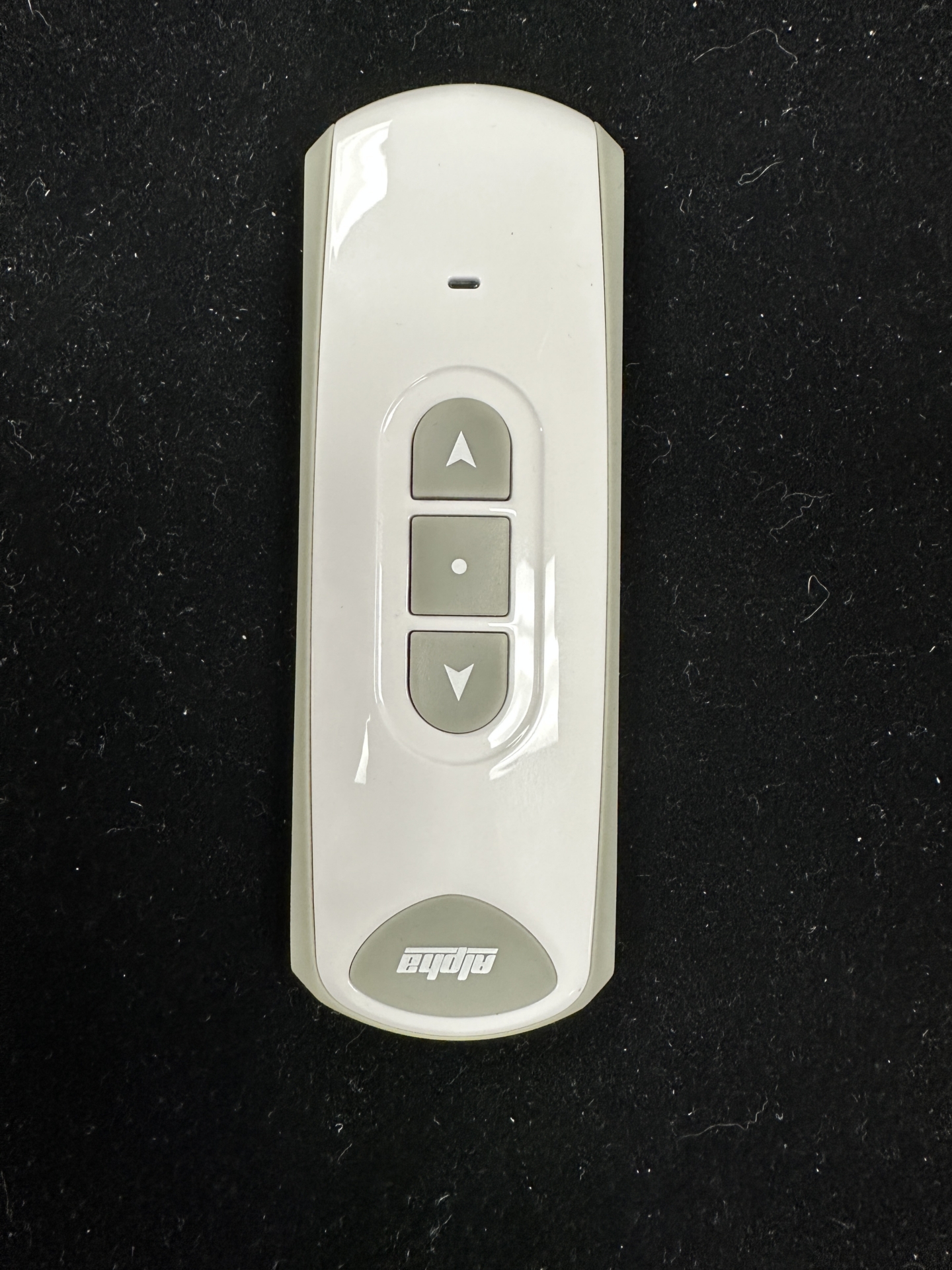
Pairing the Remote to the Motor #
METHOD 1: (Only works for first remote assigned to motor) #
Apply power to the motor (motor will jog).
On the transmitter (remote), press the UP and DOWN buttons together and release.
Press the STOP button once (motor will jog if successful).

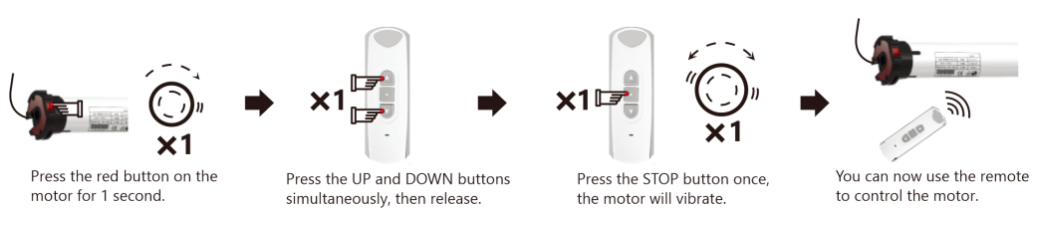
METHOD 2: (This method will work anytime) #
Tap (don’t hold) the red button on the motor head (motor will jog).
Press the UP and DOWN buttons together, and release.
Press the STOP button once (motor will jog if successful).
METHOD 3: (Must already have a remote assigned) #
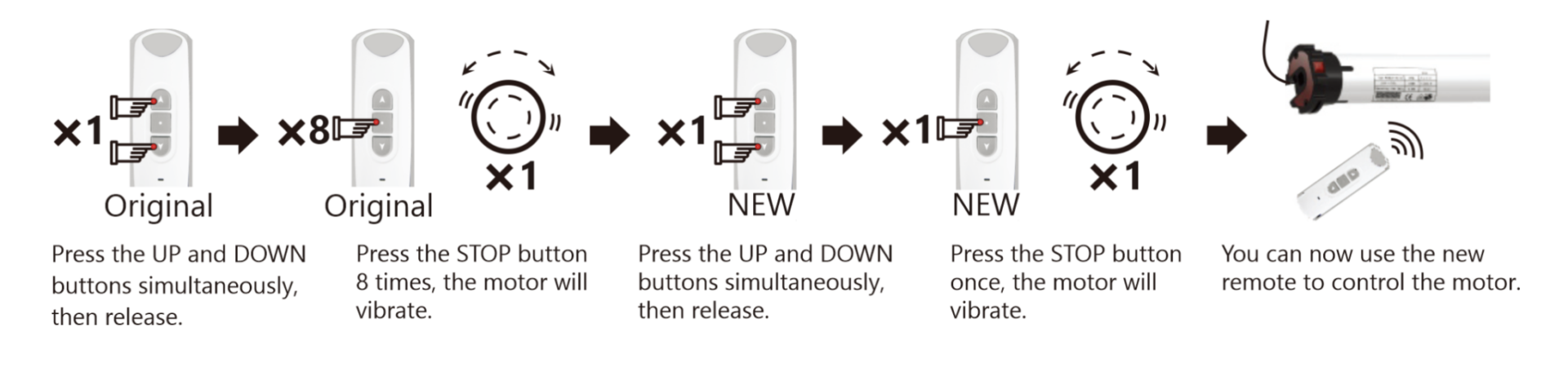
Using the first remote, press the UP and DOWN buttons together, and release.
Press the STOP button 8 times (motor will jog if successful).
Then, using a second remote, press the UP and DOWN buttons together and release.
Press the STOP button once (motor will jog if successful).
The extra remote (or channel) is now assigned.
Changing Motor Direction #
METHOD 1: #

METHOD 2: #

Setting Motor Limits #
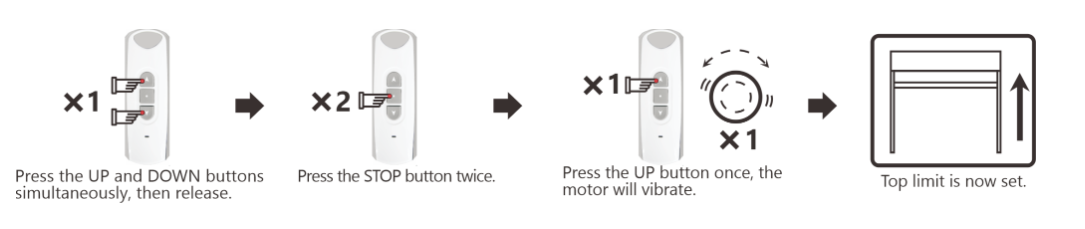
Upper Limit #
Position the shade at your desired upper limit.
Press the UP and DOWN buttons together, and release.
Press the STOP button twice within 10 seconds.
Press the UP button once within 10 seconds, the motor will jog.
The upper limit is now saved.
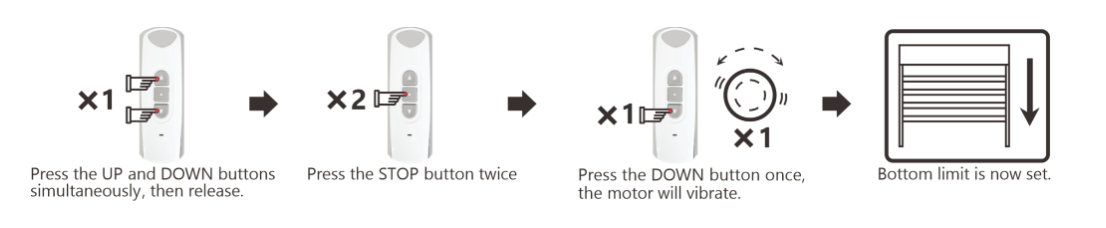
Lower Limit #
Position the shade at your desired lower limit.
Press the UP and DOWN buttons together, and release.
Press the STOP button twice within 10 seconds.
Press the DOWN button once within 10 seconds, the motor will jog.
The lower limit is now saved.
Deleting Limits #
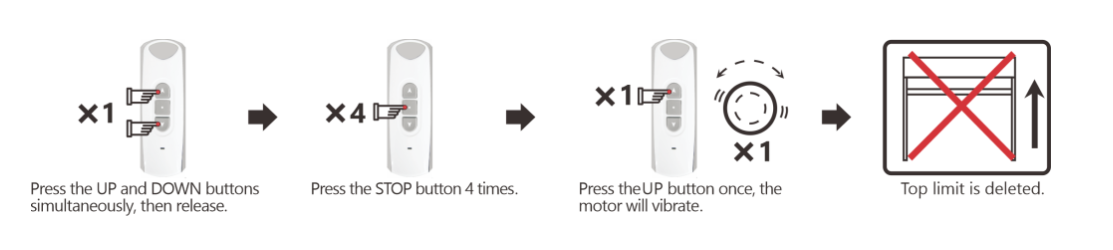
Deleting the Upper Limit: Move the shade to the desired position. Press the UP and DOWN buttons together, then release. Press the STOP button 4 times, then press the UP button. The motor will jog.
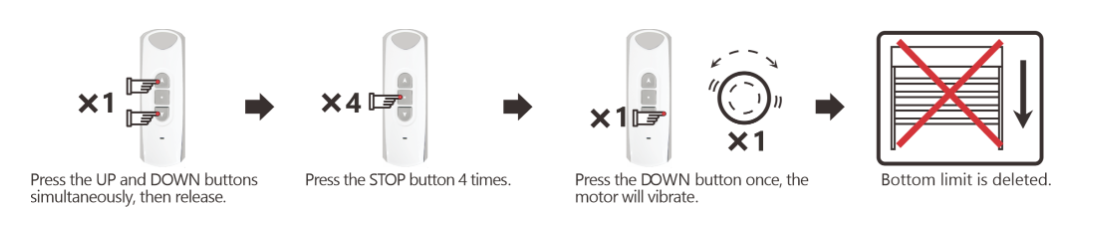
Deleting the Lower Limit: Move the shade to the desired position. Press the UP and DOWN buttons together, then release. Press the STOP button 4 times, then press the DOWN button. The motor will jog.
Setting the Third Limit (Favorite Position) #
Move the shade to the desired position.
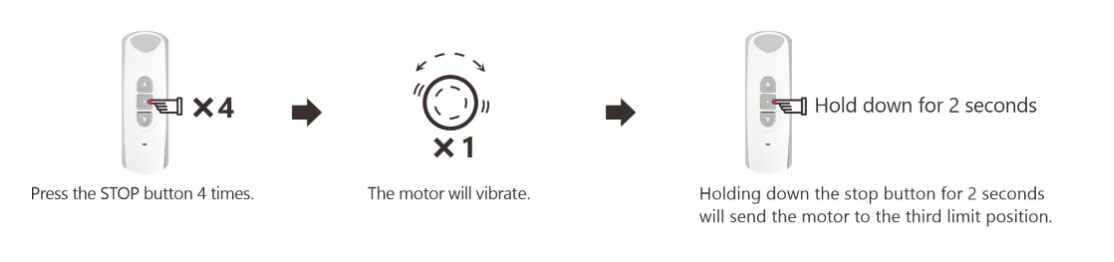
Press the STOP button 4 times, the motor will jog.
The third limit has now been set.
To send the shade to the third limit: Hold the STOP button down for ~2 seconds.
Changing the Third Limit #
Move the shade to your new desired position.
Press the STOP button 4 times, the motor will jog.
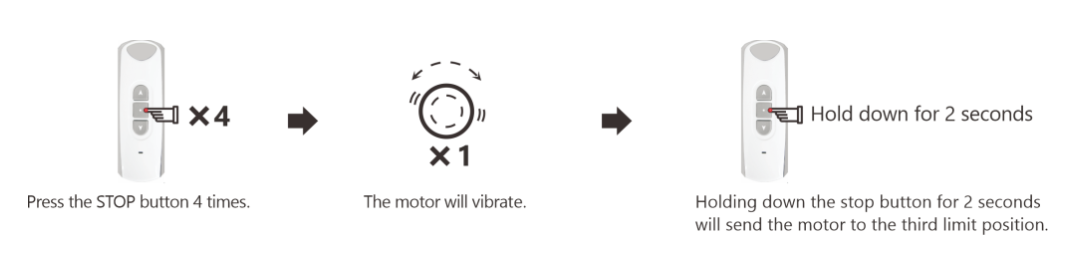
Important: The third limit will be deleted automatically if either the upper or lower limits are deleted.
Adding an Extra Remote #
Deleting Remote Controls #
Deleting one remote: Using the remote you wish to delete, press the UP and DOWN buttons together and release. Press the STOP button 7 times, then press the UP button.

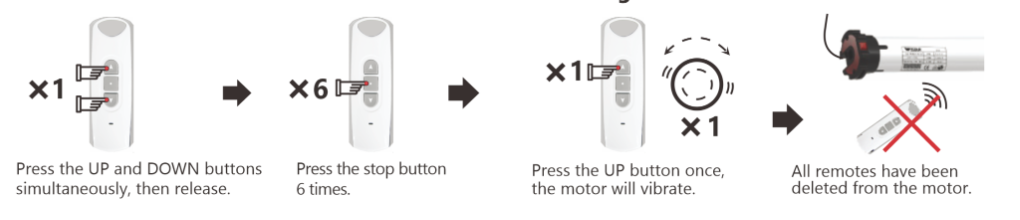
Deleting all remotes: Press the UP and DOWN buttons together, then press the STOP button 6 times, then press the UP button. Press the STOP button until the shade jogs to validate the end limit setting. Briefly press the programming button on the back of the transmitter: the shade jogs.
Obstacle Detection #
Motor Obstacle Detection Setup and Function #
Obstacle detection is available only after setting the motor’s TOP and BOTTOM limits.
Detection is disabled within 8″ above the BOTTOM limit to allow full screen closure.
Obstacle detection does not work if the motor is in “step-by-step” mode.
The Obstacle Detection function is turned OFF by default.
To Turn ON Obstacle Detection: #
Press and release UP and DOWN simultaneously.
Press the STOP button three times, then release.
Press and release the UP button once.
The motor will “jog” (briefly move) to confirm obstacle detection is ON.
To Turn OFF Obstacle Detection: #
Press and release UP and DOWN simultaneously.
Press the STOP button three times, then release.
Press and release the DOWN button once.
The motor will jog to confirm obstacle detection is OFF.
How Obstacle Detection Works: #
If an obstacle is detected while moving down:
The motor stops, moves up by 180°, and tries moving down again.
If the motor detects the same obstacle three times at the same spot, it moves up 180° and stops.
If the motor detects obstacles three times at different spots (more than 2″ apart), it moves up toward the UPPER limit.
Step by Step Mode #
Activate Step by Step Mode #
Press the UP and DOWN buttons simultaneously, then release
Press the STOP button once
Press the UP button once, the motor will jog.
The motor is now in step-by-step mode
De-activate Step by Step Mode #
Press the UP and DOWN buttons simultaneously, then release
Press the STOP button once
Press the DOWN button once, the motor will jog.
The motor is now out of step-by-step mode
Programming Tips:
Always roll the blind down and up before setting the top limit. Failure to do so may result in a change of limit position due to a change in blind tension. Simply setting the bottom limit first will prevent this happening.
When pressing up and down simultaneously during setup, be as precise as possible. Ideally it should sound like one button click when both are pressed.
If you catch yourself making an error during a setup process, stop and allow 10 seconds for the motor to time out, then try again.
Do not hold any buttons down during setup process unless specifically told to do so. A half second press should be plenty and allow 1 second between presses.
If you are using a multi-channel remote, make certain that it is on the correct channel before you assign it to a motor. This is a common mistake.
Troubleshooting #
Observations | Possible Causes | Solutions |
|---|---|---|
The shade does not operate. | Wiring is incorrect. | Check and modify the wiring as required. |
Remote battery is low. | Check and replace the battery if necessary. | |
Remote is incompatible. | Verify compatibility and replace if needed. | |
Remote is not programmed. | Use a programmed remote or program a new one. | |
The shade stops too soon. | Ring or crown is not secured. | Secure the ring or crown correctly. |
End limits are incorrect. | Reset the end limits. |
Technical Data #
Radio Frequency: 433.42 MHz
Power Supply: 120v ~ 60 Hz
Protection Rating: IP 44
Rated Torque: 30 Nm
Nominal Consumption: 186 Watts
Nominal Current: 2.4 A