
Advanced Features #
Reports & Backups #
Creating a Site File (Backup) #
Important: Site File will only Backup 485 Devices. Wireless Devices will not be backed up.
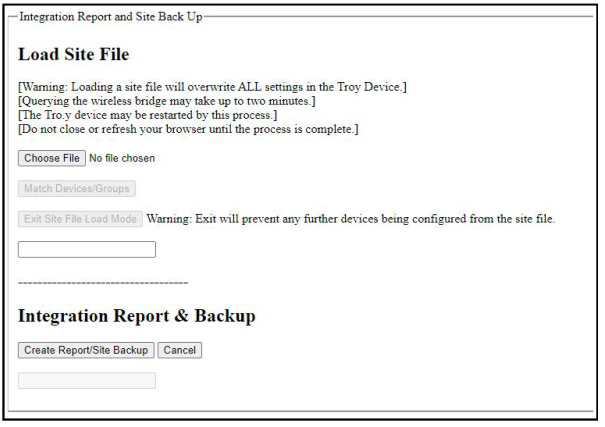
Click the “Report” button to open the Integration Report menu

From here, you can create, delete, save, and load site files and reports
Reports are saved as .csv files
Click “Create Report / Site Backup” to start the process (may take 1-2 minutes)
A progress bar will show the status of the file creation
Go to the Aggregate Table to verify all devices and settings are loaded correctly

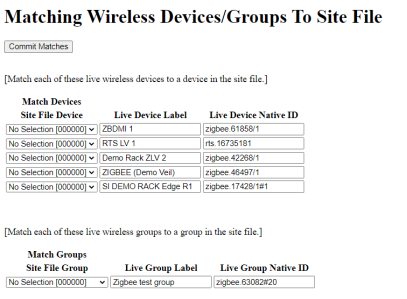
Loading Site Files #
Important: Loading a Site File into TRO.Y 2 will overwrite all settings.
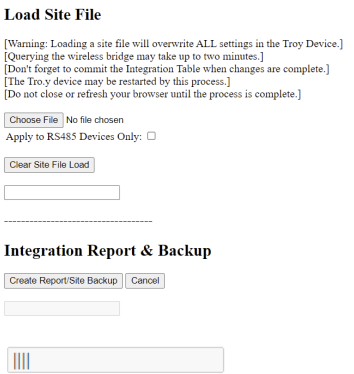
Wireless bridges may take up to 2 minutes to load
Do not close the browser until the process is complete
After loading, commit the integration table to save changes
TRO.Y 2 may need to reboot during this process
TaHoma / Link ProZ Integration #
For TaHoma cloud or Zigbee network diagnostics (link quality, signal strength, account issues), escalate to Somfy Technical Support (877-437-6639 / technicalsupport_us@somfy.com) — SI does not have access to Somfy’s cloud accounts.
Wireless Bridge Settings – Link ProZ / TaHoma / TaHoma Switch #
Open the Integration Settings
Click “Show” to start the Telnet Server
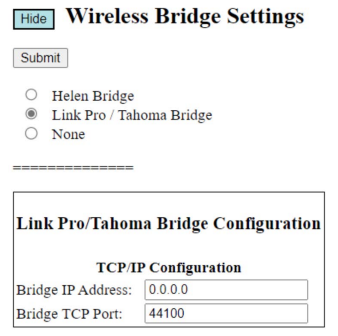
Select “Link Pro / TaHoma Bridge”
Click “Submit” to save your settings
Restart TRO.Y
Enter the IP address for the Link ProZ, TaHoma, or TaHoma Switch
Default Port: 44100
1-Way Serial (RS-232) Control #
How to Set Up Telnet for Serial Control #
Click “Show” to start the Telnet Server
Select “Serial Port”
Enter “Baud Rate”, “Parity”, and “Stop Bits”
Default TRO.Y / 2 Serial Settings #
Baud Rate: 4800-56K
Control Bit: 8
Parity: None
Stop Bits: 1
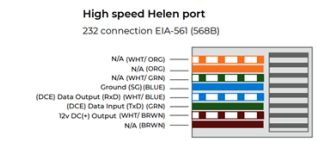
Tip: Serial port data output (WHT/BLUE) is the transmit (TX) from TRO.Y / 2 DCE on pin 5.
Serial port data input (GRN) is the receive (RX) to TRO.Y / 2 DCE on pin 6.
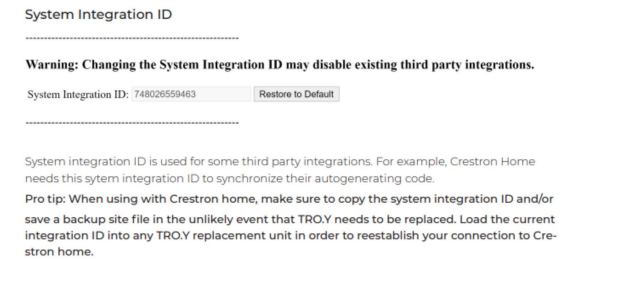
System Integration ID #
The System Integration ID allows third-party integrators to identify and control TRO.Y devices in their systems.
JSON RPC API Commands #
Move Commands #
{"method":"move","params":{"nodeid":"XXXXXX","value":"up"}}
{"method":"move","params":{"nodeid":"XXXXXX","value":"down"}}
{"method":"move","params":{"nodeid":"XXXXXX","value":"stop"}}
Move to IP (Intermediate Position) #
{"method":"move","params":{"nodeid":"XXXXXX","value":"ip","data":"1"}}Move to Percentage #
{"method":"move","params":{"nodeid":"XXXXXX","value":"pos","data":"50"}}HTTP Commands #
Warning: Always backup your site file before using HTTP commands.
HTTP Command Format #
http://###.###.###.###/troy.cgi?cmd=70&str1=XXXXXX&str2=$$Where: IP address, Node ID, and Command (up/down/stop)