Overview #
Helen is a Zigbee device that can function as either a coordinator (connected directly to TRO.Y2) or a router (extending your mesh network). This guide covers setup, configuration, and troubleshooting for both modes.
Info: Helen devices come pre-configured from the factory. Look for the pink label “Helen of TRO.Y2” for coordinator units.
Connecting Helen as a Coordinator #
When Helen functions as a coordinator, it connects directly to the TRO.Y2 and manages the entire Zigbee mesh network.
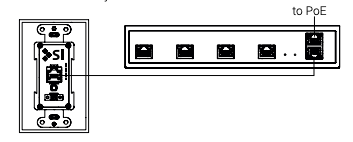
Power the TRO.Y2 – Connect the TRO.Y2 to PoE (Power over Ethernet) – either through a PoE switch (do not exceed 48V) or use the included PoE injector.
Locate the Helen device – Find the device labeled “Helen” (look for the big pink label on the box marked “Helen of TRO.Y2” if pre-configured from the factory).
Connect to the Helen port – Connect it to the Helen port on the TRO.Y2 using the included Cat5e cable.

Check the status LEDs – Check the status LEDs on the TRO.Y2:
If the LEDs stay on, the coordinator is active and building your mesh network
The RED, GREEN, and BLUE LEDs on the Helen will be solid
LED Troubleshooting #
If the LEDs are ON but blink OFF every 2.5 seconds: #
This means the Helen is already pre-configured as a mesh router.
What to do:
Disconnect it from TRO.Y2
Power it using the included PoE injector or auxiliary power input
Then, find the Helen labeled “Helen of TRO.Y” (look for the pink label) and connect that one to TRO.Y2
Can’t find the Helen of TRO.Y? #
You can use any Helen to start a new Zigbee network:
Connect it to the Helen port on TRO.Y2
Go to Integration Settings → Wireless Bridge Settings and turn on Helen Bridge
Reboot TRO.Y2
Wait 1-2 minutes for the new Zigbee mesh to initialize
Once the Helen’s LEDs stay solid ON, the network is ready and you can start adding Zigbee devices
Refer to the TRO.Y2 manual for steps to add devices
If the LEDs are OFF but blink ON every 2.5 seconds: #
This Helen is not yet configured.
SI shades come pre-configured, so look for the pink-labeled Helen of TRO.Y and connect that one to TRO.Y2.
Connecting Helen as a Router #
Helen routers extend your Zigbee mesh network coverage and can be placed throughout your installation.
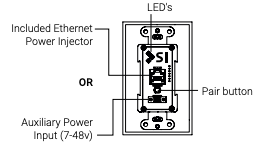
Connect Helen to power
Tip: Helen can be powered by anything from 7-48V
Tip: Helen comes with a PoE Injector that can be used for power
Note: PoE Injector does not need to be connected to the network, only used to power Helen
Note: Some PoE Switches may not power Helen
Check status LEDs – If LEDs stay on, the router is working.
LED Troubleshooting #
If the LEDs are ON but blink OFF every ~2.5 seconds: #
You may have connected a Helen of TRO.Y, which is already set up as a Coordinator.
Fix: Disconnect it from power, then plug it into the Helen port on TRO.Y.
If the LEDs are OFF but blink ON every ~2.5 seconds: #
This Helen hasn’t been set up as a Router yet.
To set it up as a router: #
On TRO.Y2, open the Device Integration table
Click “Open Zigbee Pairing”
On the Helen device, press and hold the pairing button until the LEDs start flashing rapidly, then release
When the LEDs stay solid, it’s connected and your mesh is building
Factory Reset #
Use this procedure to completely reset a Helen device to factory defaults.
Warning: This will erase all network configuration and the device will need to be re-paired.
Disconnect from Helen port – Remove the Helen Coordinator from the Helen Port, and plug into any of the TRO.Y’s BUS Outs.
Hold the reset button – Push and HOLD the button on the back of the Helen for about 20 seconds. When the 3 LEDs flash, let go of the button.
Mounting #
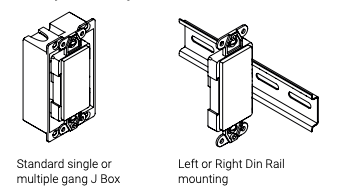
Warning: Do not mount Helen in a metal J box
Helen can be mounted in various locations to optimize Zigbee coverage throughout your installation.
Parts in the Box #
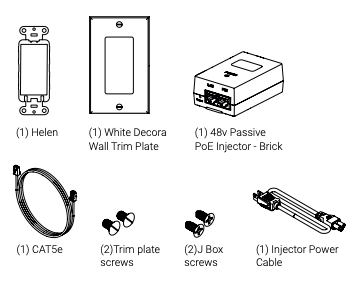
The Helen package includes all necessary components for installation: