LED Kit Setup #
Troubleshooting #
If LEDs are limited to white only and will not change color, manually cycle through the color modes using the physical button on the controller:
Red → Green → Blue → White
After selecting a color mode, power cycle the controller. Then refresh the Hue app.
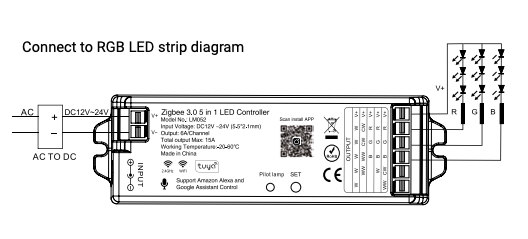
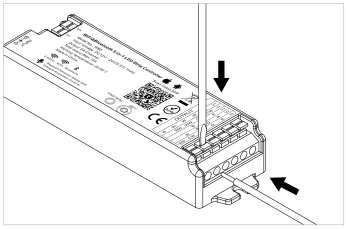
Connect to LED Strip #
⚠
WARNING: Input voltage must equal output voltage. Verify before connecting.
Initial Setup (6 Steps) #
Step 1: Connect Power Supply #
Connect the power supply to the IP LED controller.
Step 2: Open Hue App #
Open the Philips Hue app. Tap the “…” menu and select “Add Lights.”
Step 3: Enter Discovery Mode #
Press and hold the “SET” button on the IP LED controller until it flashes purple. This indicates Discovery Mode is active.
Step 4: Search in Hue App #
Tap “Search” in the Hue app and wait. When the LEDs flash green, the controller has connected successfully.
Step 5: Identify Correct Light #
The controller will appear as two lights: “Extended Color light 1” and “Dimmable light 1”. Use the Extended Color light — this provides full color control. DELETE the “Dimmable light 1” entry.
Step 6: Rename and Use #
Rename the light to something recognizable (e.g., “Screen LEDs”) and use it like any other Hue lamp in your setup.
Legacy IP LED Kit #
Initial Setup (6 Steps) #
Step 1: Plug In Power Supply #
Plug in the power supply. The LEDs will turn white.
Step 2: Open Hue App #
Open the Philips Hue app and navigate to Settings → Light setup.
Step 3: Add Light #
Tap the “+” button and select “Search.”
Step 4: Wait for Connection #
Wait for the app to discover the controller. Connected LEDs will turn green.
Step 5: Identify Correct Light #
You will see “Extended Color Light 1” (use this) and “Dimmable Light 1” (delete this).
Step 6: Rename and Use #
Rename the light and use it like any Hue lamp.
Reset Procedure (7 Steps) #
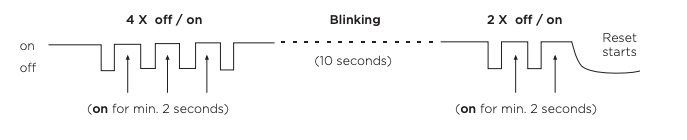
Step 1: Make sure the LED IP controller is powered on.
Step 2: Turn the controller off for at least 2 seconds.
Step 3: Turn it back on and wait for the LEDs to illuminate.
Step 4: Repeat the off/on cycle for a total of 4 times.
Step 5: The LEDs will blink for approximately 10 seconds.
Step 6: After the blinking stops, repeat the off/on cycle 2 more times.
Step 7: The LED IP controller resets and the LEDs return to white. You can now re-pair with the Hue app.